multi_object_memory_2025
Working Memory of Multi-Object Scenes in Primate Frontal Cortex
Introduction
This webpage is the entrypoint for the code and data supporting the paper “Working Memory of Multi-Object Scenes in Primate Frontal Cortex” (Watters et al., 2026). This paper studies the neural mechanisms of multi-object working memory in the primate brain. It involves neurophysiology data collected from monkeys trained on a working memory task and computational modeling to test hypotheses of neural mechanisms in that data.
This website is intended for users who want to replicated the results in our paper or want to use our data for your own research.
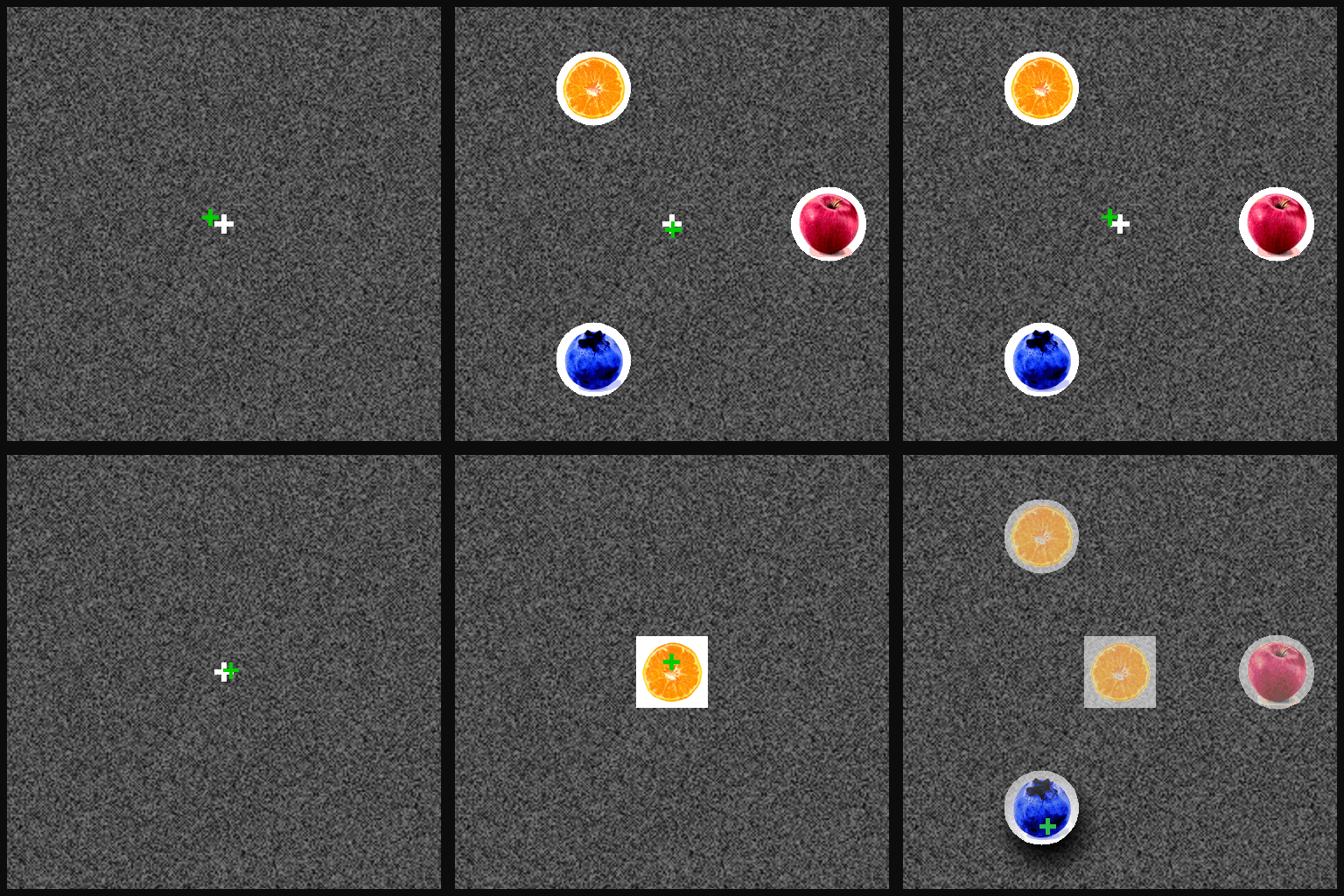
Here’s a video of our multi-object working memory task (played by a monkey whose gaze position is the green cross):
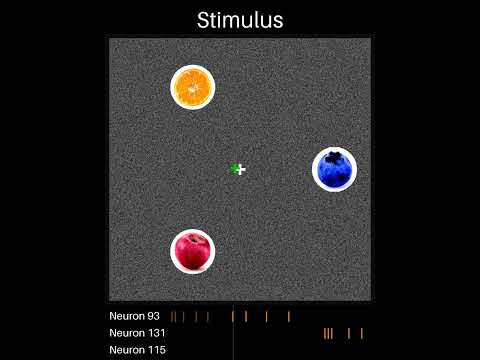
And here’s a video where you can listen to neurons recorded simultaneously with
the task:
Codebase Organization
Our codebase is written entirely in python, and consists of the following directories:
figures/: This directory contains code to generate the figures in our paper. It contains one sub-directory for each figure, and Jupyter notebooks to produce specific plots.cache/: This directory contains data needed to generate the figures. The data is too large to include in this GitHub repo, but instead can be found on our OSF repo at https://osf.io/vyw49. See “Getting Started” for details.behavior_processing/: This directory contains code for processing our raw behavior data into a form that can be used to generate our figures. Seebehavior_processing/README.mdfor details.phys_processing/: This directory contains code for processing our physiology data into a form that can be used to generate our figures. Seephys_processing/README.mdfor details.phys_modeling/: This directory contains code for our physiology modeling paradigm. Seephys_modeling/README.mdfor details.task_visualization/: This directory contains code for visualizing our task, the monkeys’ behavior, and neural data. Seetask_visualization/README.mdfor details.
Usage
Getting Started
Navigate to our codebase: https://github.com/jazlab/multi_object_memory_2025
Download that repository by downloading it as a zip from GitHub or cloning using git commands.
Before running any code, we recommend using a virtual environment (e.g. using miniconda or pipenv) to manage dependencies. Once in a virtual environment with python version at least 3.10.0, install the necessary dependencies with:
pip install -r requirements.txt
Download and familiarizing Yourself With Our Data
Go to https://osf.io/vyw49 and download
data_for_figures.zip. This is ~4.5 GB zipped and ~10.5 GB unzipped, so be sure
you have enough storage space. Unzip the resulting file. It will contain folders
behavior_processing, dandi_data, figures, modeling, and
phys_processing. Move these folders all to the cache/ directory.
Now you can familiarize yourself with our data by doing two things:
- Visualize a trial by opening and running the Jupyter notebook
./task_visualization/demo_replay_trial.ipynb. - Plot a neuron’s PSTH by opening and running the Jupyter notebook
./phys_processing/psths/demo.ipynb.
To further familiarize yourself with our data, you can also look at PSTHs and
summary plots for all of our recorded units from our OSF dataset. In the
phys_processing folder of the cache you downloaded and unzipped, you will see
the folders psths and unit_summary_plots. Inside psths you can find PSTH
plots for all of our units labeled good (single neurons) by our spike sorting
pipeline. Inside unit_summary_plots you can find PSTH plots for all of our
recorded units. We recommend looking through some of the PSTHs to both the
diversity of responses across units and get an intuition for common patterns of
modulation. Our best sessions are Perle/2022-05-31 and Perle/2022-06-01, so
we recommend starting there.
Reproducing Figures
The code to generate each of the figures in our paper is in ./figures/. Each
directory there corresponds to one figure, with Jupyter notebooks that generate
plots for each panel in the figure. After you have downloaded our data and
propagated the cache directory, each of these notebooks can be run.
Full Data Processing Pipeline
We have open-sourced all of our data, including behavior, task, raw physiology,
and spike-sorted physiology, on DANDI as
dataset 000620. You can download
that data using the script ./download_dandi_data.py (see documentation at the
top of that file for instructions). However, note that the raw physiology data
is several terabytes, so we recommend only downloading the behavior/task and
spike-sorted physiology data.
To replicate our data processing pipeline from the DANDI data files, you must
first convert the raw task/behavior files to dataframes by navigating to
./behavior_processing and running run_cache_data.py there.
To process the spike-sorted DANDI physiology files, for each unit you must
extract spike times per trial and compute AUC selectivity metrics. See the
documentation and scripts in ./phys_processing for how to do that. These
scripts take several hours to run on a laptop, so we do not recommend running
them. We’ve provided the results of these scripts in /cache/, so you do not
have to re-run them to reproduce our figures.
If you want to spike-sort our raw data, we have provided the raw physiology files on DANDI. We spike-sorted these by doing drift correction, running Kilosort 2.5, applying custom automated quality labeling pipeline, and manually curating the results. Our spike-sorting pipeline is not included in this package, but we recommend looking at the SpikeInterface toolkit if you’d like to spike-sort yourself.
Contact and Support
Please email Nick Watters at nwatters@mit.edu with questions and feedback. If you plan to use our data for your own research, we encourage you to email Nick Watters (nwatters@mit.edu) or Mehrdad Jazayeri (mjaz@mit.edu) so we can help you determine whether our data is useful for your scientific goals and discuss any limitations or challenges that might arise.
Reference
If you use our data or code (or a derivative of our data or code) in your work, please cite it as follows:
@article {Watters2026.01.27.702062,
	author = {Watters, Nicholas and Gabel, John and Tenenbaum, Joshua and Jazayeri, Mehrdad},
	title = {Working Memory of Multi-Object Scenes in Primate Frontal Cortex},
	elocation-id = {2026.01.27.702062},
	year = {2026},
	doi = {10.64898/2026.01.27.702062},
	URL = {https://www.biorxiv.org/content/early/2026/01/30/2026.01.27.702062},
	journal = {bioRxiv}
}